CO₂ Laser Lens Comparison & Selection Guide 1.5″, 2″, 2.5″, and 4″ Lens
 2026-04-24

Bolt Series
Professional High-Precision Laser Engraving Machine

Nova Series
Large Format Glass Tube Laser Cutting Machine

Nova Plus Series
Business-grade RF CO₂ Laser Cutter

Nova Pro Series
Professional Laser Cutting & Engraving System

Titan Series
Industrial-grade Laser System

Titan Pro Series
Industrial-grade Dual-laser System


WHAT ARE YOU LOOKING FOR?
Search Across Products, Blog Posts, Support Content, And Resources.

CO₂ Laser Lens Comparison & Selection Guide 1.5″, 2″, 2.5″, and 4″ Lens
2026-04-24

If you have ever looked at CO₂ laser lens options, you have probably seen sizes like 1.5″, 2.0″, 2.5″, and 4.0″. These numbers describe focal length, not the physical diameter of the lens. The right choice depends on the detail you need, the material thickness, and how consistently you can keep the surface in focus.
This guide compares the four common focal lengths, shows engraving samples from Thunder Laser’s published lens comparison, and explains what to check before changing your lens.
| Your main task | Lens to consider | Main tradeoff |
|---|---|---|
| Small text, fine graphics, or detailed photographs | 1.5″ on a compatible head | Fine-detail potential, with greater sensitivity to focus and surface flatness. |
| Everyday engraving and cutting | 2.0″ or the standard lens supplied with your machine | A practical starting point before adding a specialist lens. |
| Cutting where more focus tolerance may help | 2.5″ | A compromise between focused spot size and depth of focus; verify the result on your material. |
| Specialist thick-material work or additional clearance | 4.0″ with a compatible assembly | Longer focus range, but a larger focused spot; cutting improvement is not guaranteed. |
These are starting choices, not maximum-thickness ratings. Machine power, beam characteristics, material, focus position, nozzle arrangement, and the required finish all affect the result. Check your machine’s supported lens assemblies before buying.
For practical selection, focal length describes where a lens brings the beam to focus. With comparable input beams and wavelength, a shorter focal length generally produces a smaller focused spot and a shorter focus range; a longer focal length gives a larger spot and a longer focus range.
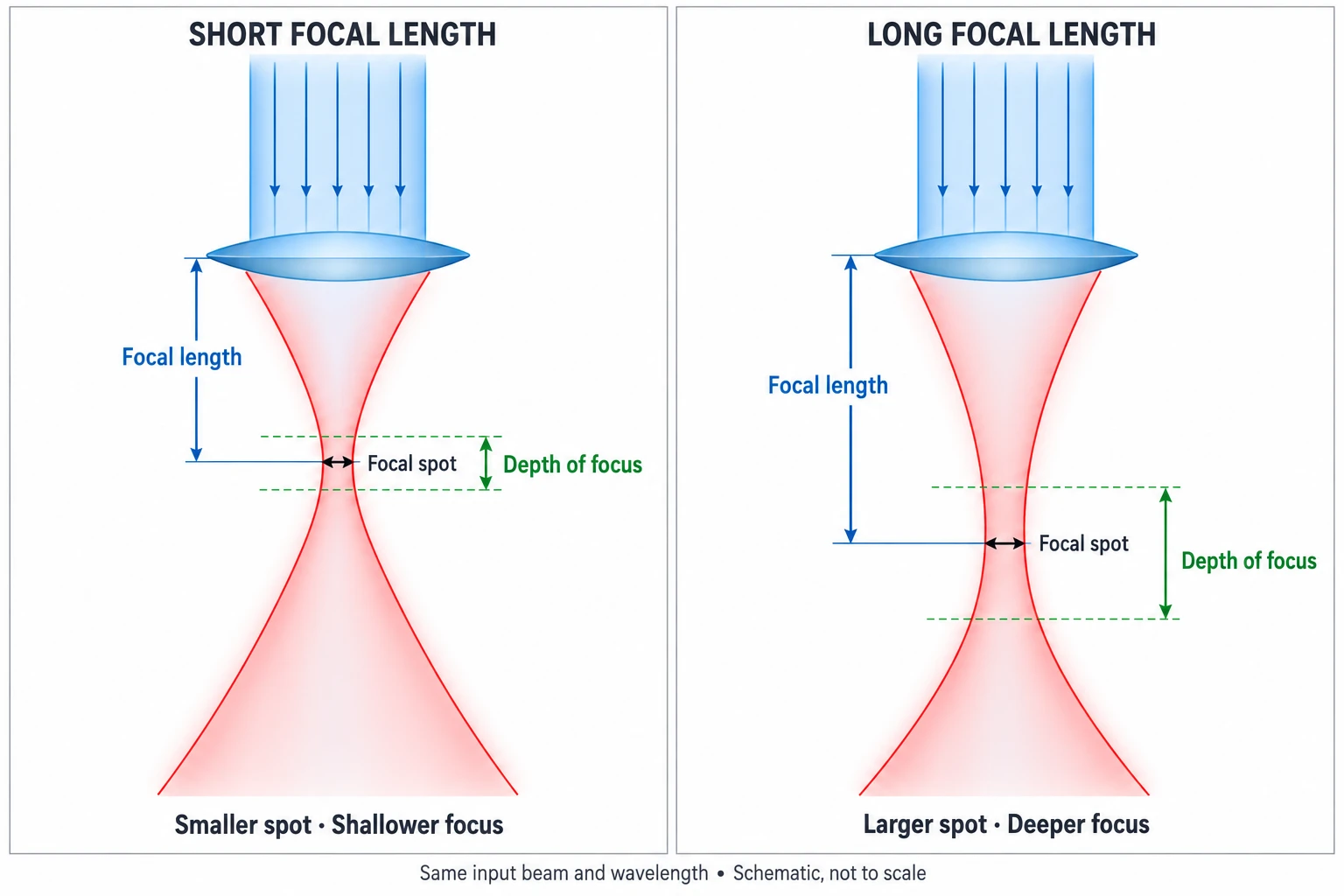
A smaller focused spot can help separate fine lines, small lettering, and photo details. It does not automatically improve every engraving: artwork preparation, scan interval, power, and the material’s response also influence the finished mark.
For filled areas, the scan interval must suit the marks produced on the material. Lines spaced too far apart can leave visible gaps; excessive overlap can add heat and obscure detail. Higher DPI alone does not guarantee a sharper result.
Depth of focus describes the axial range over which the beam remains sufficiently concentrated for a defined purpose. A longer focal length can tolerate more height variation, but acceptable focus for small lettering may be stricter than for a large filled shape. It does not make a curved or warped surface equivalent to a flat one.
A longer focus range can help with some thick-material jobs, but the larger focused spot reduces energy concentration at the same delivered power. Judge the finished cut—cut-through, wall taper, kerf, edge finish, and detail survival—rather than choosing by thickness alone.
Do not confuse focal length with nozzle-to-material clearance. A 2.0″ lens does not mean that the nozzle tip should sit 2.0″ above the surface. Use the focus procedure and gauge specified for the installed lens assembly. If you need to review the focusing workflow, see How to Focus Your Laser Machine.

The 1.5″ lens is worth considering when small text, fine graphics, or photo engraving detail is the main requirement. Suitable tasks include detailed work on verified laser-compatible two-color sheet, thin acrylic, paper, or appropriate coated surfaces.
What to check: Keep the surface flat and focus accurately. A shorter focal length cannot recover detail missing from the artwork or compensate for excessive heat.

A compatible 2.0″ lens is a useful starting point for mixed daily work, including wood and acrylic engraving and cutting, thin-sheet cutting, and general graphics. If the installed standard lens already meets your quality requirements, there may be no reason to replace it.
What to check: Consider another lens when a measured limitation remains after focus, artwork, settings, and optical condition have been checked.

The 2.5″ lens offers a longer focus range than a comparable 2.0″ lens. It can be useful for cutting jobs where edge consistency or modest height variation matters, while still supporting general engraving.
What to check: Compare it on the actual design. More focus tolerance may come with less fine-detail capability, and each lens needs suitable process settings.

A compatible 4.0″ lens can be useful for selected thick, low-density materials such as verified foam grades, or applications requiring a longer focus range. The larger spot makes it a specialist choice rather than an automatic upgrade for every thick sheet.
What to check: Do not assume it will cut thick acrylic or wood faster on every machine. Deep engraving and recessed objects also require checks of energy concentration, access, and head clearance.

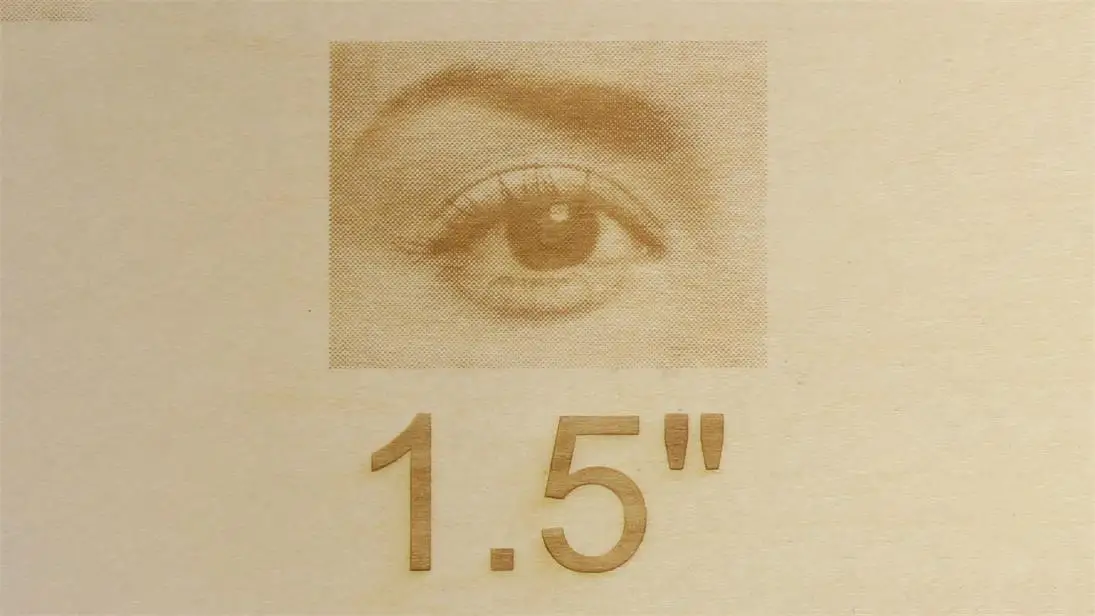
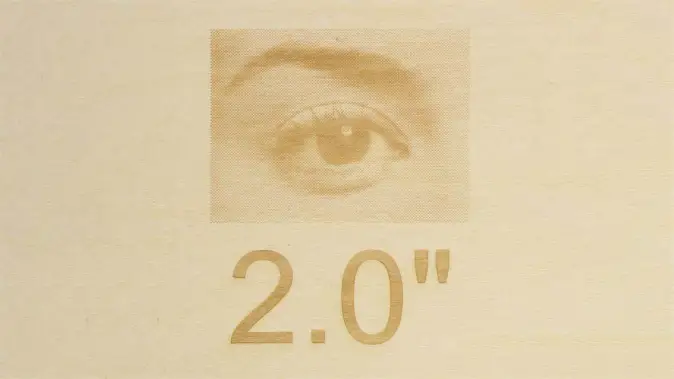
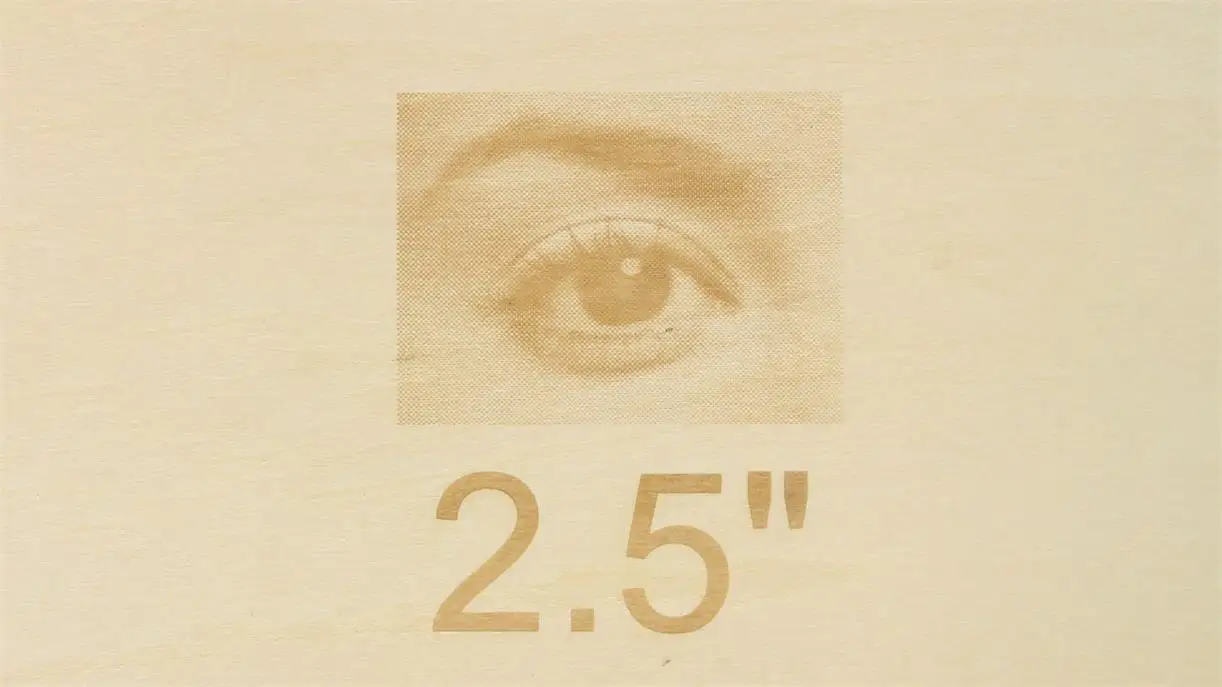
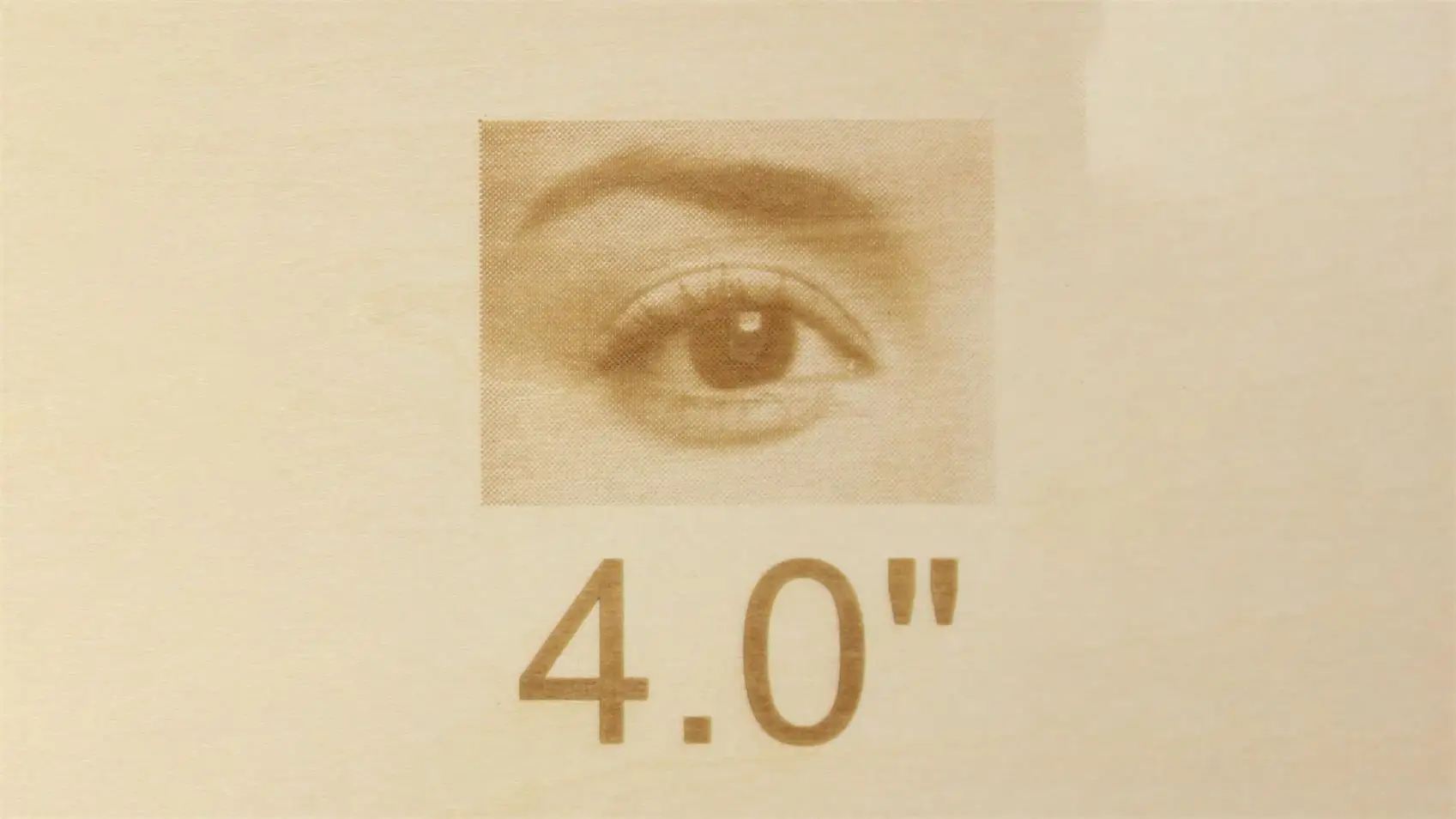
Thunder Laser’s published Bolt lens comparison uses the same image, speed, and power across four focal lengths. The settings below are reported for that comparison; they are not universal photo-engraving settings.
| Reported setting | Value |
|---|---|
| Speed | 1500 mm/s |
| Power | 30% |
| Picture mode | Halftone |
| Halftone cells per inch | 90 CPI |
The source does not provide a complete material specification, laser wattage, scan interval, and focus record. Treat these photographs as an illustrative comparison, not a fully reproducible benchmark or proof of the best result each lens can achieve. Halftone CPI describes the screen pattern and is not the same as scan DPI.
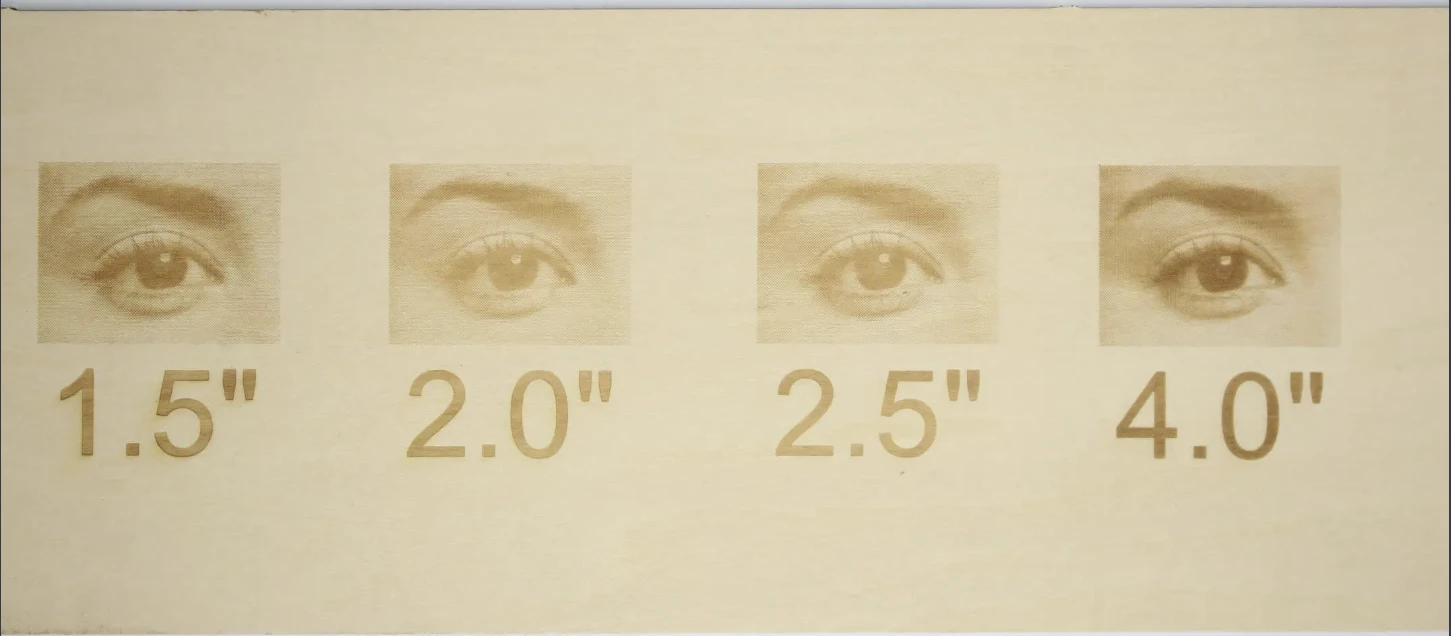
Look at eyelash separation, the edge of the iris, and the transition between light and dark areas. The photographs have different crops and apparent brightness, so they do not establish equal-magnification resolution measurements.
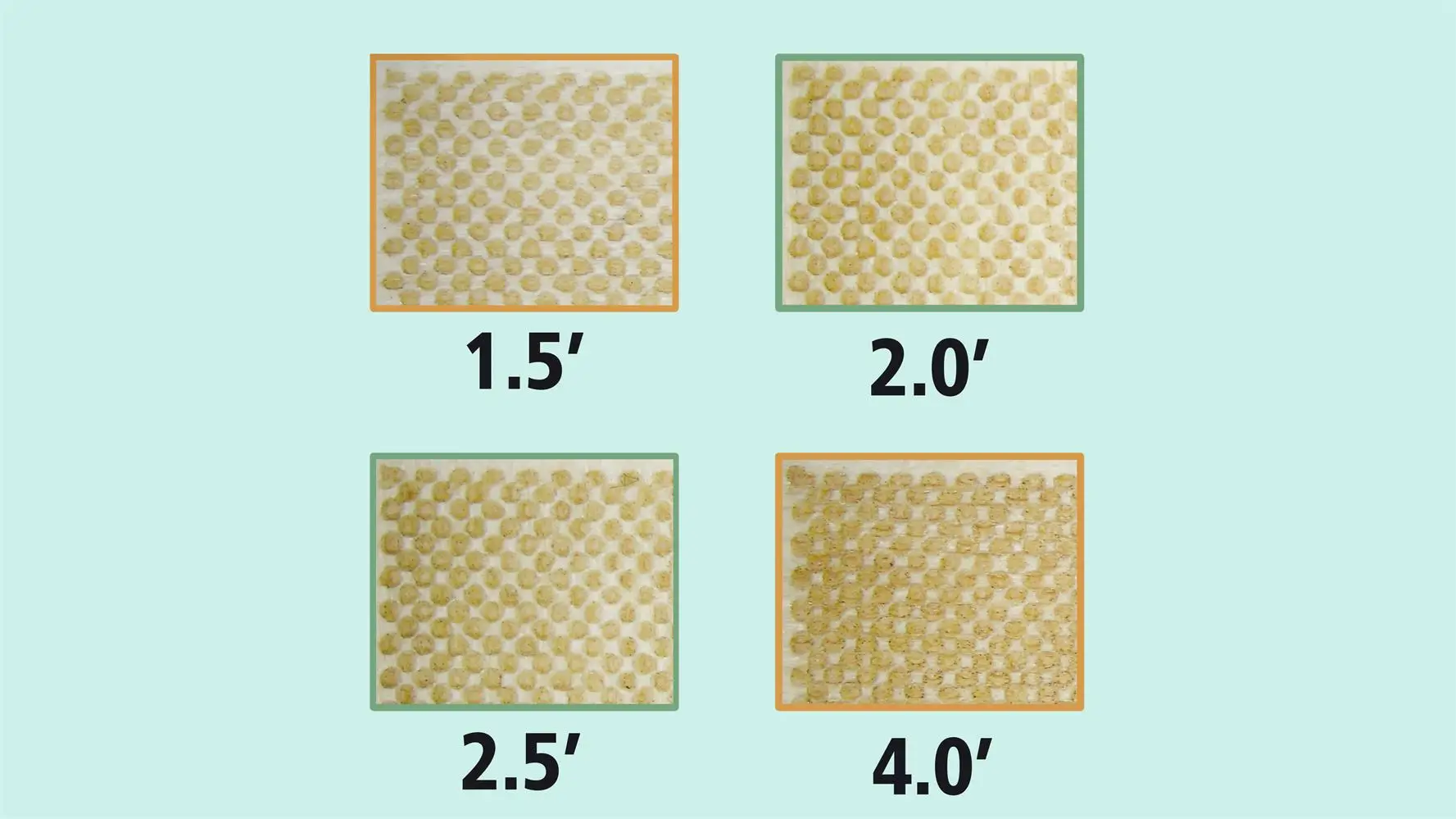
Changing the lens alone does not normally change job duration when speed, scan interval, paths, and passes remain unchanged. Time becomes a separate comparison only if settings are adjusted to meet a defined finish. The supplied images do not establish a processing-time advantage.
Use the table to shortlist compatible lenses, then test the feature that matters in your product. It is not a chart of guaranteed cutting thicknesses. For relevant starting parameters, use the CO₂ laser material settings library.
| Material or task | Starting lens choice | Acceptance check |
|---|---|---|
| Small text and photo engraving on verified compatible material | 1.5″ or 2.0″ | Readable characters, separated details, and suitable tonal reproduction. |
| Plywood, solid wood, MDF, or bamboo cutting | Standard 2.0″ or 2.5″; evaluate 4.0″ only where justified | Cut-through, edge residue, wall taper, fine-feature survival, and fit. |
| Acrylic engraving and cutting | 2.0″ or 2.5″ for general work; confirm any longer-lens benefit | Engraving coverage, cut-edge finish, kerf, and usable cutting speed. |
| Verified EVA or PE foam | Standard lens for thinner stock; consider longer focal length for thick stock | Melting, shrinkage, top-to-bottom opening size, and actual fit. |
| Paper, card, fabric, leather, cork, or denim | Compatible standard lens; shorter focal length when fine features justify it | Fine-feature retention, separation, and surface finish without excessive heat. |
| Laser-compatible rubber stamps | 2.0″ as a starting option; compare shorter focal length for fine lettering | Letter separation, relief quality, and the finished stamp impression. |
| Glass, ceramic, stone, or curved objects | Supported standard or specialist assembly for the particular job | Surface response, focus variation, usable detail, and mechanical clearance. |
A longer lens is not a substitute for sufficient laser output, a suitable material, or a sound optical setup. If the existing lens produces an acceptable part, changing focal length is optional.
Consider a different focal length when your current setup has a specific limitation: fine characters merge despite appropriate settings, a thick cut has unacceptable taper, or the installed assembly lacks the clearance required for the object. Test a representative feature before committing a full job.
Visible cracks, chips, coating damage, burn marks, or contamination that cannot be removed using the approved procedure are reasons to stop and seek the appropriate replacement or service advice. Poor cutting alone does not identify a damaged lens: focus, alignment, material, and settings can produce similar symptoms.
Follow the maintenance instructions for your exact machine and head. Isolate the system as instructed before removing optics, keep the work area clean, organize retaining rings and small parts, and avoid touching optical surfaces. Use only the cleaning materials and handling procedure approved for that optic.
After a lens or assembly change, verify seating, the correct focus reference, and any model-specific configuration before processing a test piece. Focal length alone does not establish lens diameter, holder compatibility, or nozzle clearance.
Explore our complete video guide for tutorials across the Thunder Laser product lineup.
Start with the compatible standard lens on your machine, then consider a specialist focal length only when the finished part gives you a reason. A 1.5″ lens is worth comparing for fine detail; 2.0″ and 2.5″ cover many general tasks; 4.0″ is an option for selected thick-material or clearance requirements.
Judge the lens through the result you need: readable text, consistent fill, acceptable cut walls, and correctly fitting parts. Keep the machine, material, focus, and settings with your sample so the comparison remains useful.
Need help choosing the right CO₂ laser lens? Share your machine model, current lens assembly, material, thickness, and a photograph of the result you want to improve. Contact Thunder Laser.
Talk To Our Experts Now!
Please leave your contact information so that we can serve you better.
FAQS
NEED HELP FINDING THE RIGHT SOLUTION?
Talk to our team for machine recommendations, application advice, and support based on your needs.

 Stable & Consistent MachinesUnlimited ApplicationsRobust After-sales SupportFactory Direct Supply