


What Is a Laser Rotary Attachment? Types, How It Works & Applications
 2026-04-27
WHAT ARE YOU LOOKING FOR?
Search Across Products, Blog Posts, Support Content, And Resources.

What Is a Laser Rotary Attachment? Types, How It Works & Applications
2026-04-27

A laser rotary attachment adds a rotational axis to a laser engraving or marking system so cylindrical and curved objects can rotate while the laser processes their surface. It is commonly used for tumblers, bottles, glasses, pipes, rings, tubes, pens, and other round products that are difficult to engrave accurately in a fixed flatbed position.
The basic idea is simple: instead of moving only across a flat X-Y surface, the laser system coordinates the design with controlled rotation of the workpiece. This allows graphics, text, logos, serial numbers, or patterns to follow the circumference of the object and makes full-wrap or segmented engraving possible.
This guide explains what a laser rotary attachment is, how rotary engraving works, the main rotary types, how roller and chuck systems differ, which laser technologies can use rotary fixtures, and the main factors that affect engraving accuracy. If you already understand the basics and need to choose a rotary for a specific product, see our Laser Rotary Attachment Selection Guide. For installation and operation, continue to How to Use a Laser Rotary Attachment.
Last reviewed: September 2026.
Quick Answer: What Is a Laser Rotary Attachment?
A laser rotary attachment is a motorized fixture that rotates a cylindrical or curved workpiece while a laser engraves or marks it. Common designs include roller rotary attachments, which rotate the object through friction, and chuck rotary attachments, which clamp and rotate the object directly. The rotary movement must be coordinated with the laser controller or software so the flat artwork is mapped correctly around the curved surface.
A laser rotary attachment, sometimes called a rotary axis, rotary fixture, or laser rotary device, is an accessory that allows a laser machine to process round or curved objects by rotating the workpiece around its longitudinal axis.
On a normal flatbed laser, the workpiece stays stationary while the laser head or scanning system moves across a flat coordinate system. That arrangement works well for sheets, plaques, panels, flat leather, acrylic, wood boards, and other planar materials. A cylindrical object introduces a different problem: the surface curves away from the focal plane as the laser moves across it.
A rotary axis addresses this by turning the object during processing. The laser therefore works on a controlled portion of the curved surface while the object rotates underneath or in front of it.
| Factor | Flatbed Engraving | Rotary Engraving |
|---|---|---|
| Workpiece | Flat sheets, panels, cards, plaques | Cylinders, tubes, cups, bottles, rings |
| Workpiece movement | Normally stationary | Rotates during processing |
| Surface geometry | Mostly planar | Curved or circular |
| Typical design | Flat artwork | Localized or wraparound artwork |
Rotary engraving adds controlled rotational movement so a laser can process cylindrical surfaces more consistently.
A curved object can sometimes be engraved without a rotary when the artwork is small and stays within a narrow area of the surface. As the design becomes wider, however, the curvature causes a larger change in surface height and makes it harder to keep the complete design within a useful focal range.
Manual repositioning is another option, but it creates alignment problems. Each time the object is turned by hand, the next section must be matched to the previous one. Even small positioning errors can create visible gaps, overlaps, tilted artwork, or inconsistent engraving.
A rotary attachment replaces that repeated manual positioning with controlled rotational movement. This is particularly useful for wider graphics, repeated drinkware production, cylindrical identification marks, and designs intended to extend around a significant portion of the circumference.
Rotary engraving adds a rotational axis to the laser system. A motor turns the workpiece while the laser controller or software coordinates that rotation with the engraving path.
A flat digital design is therefore translated into linear movement around the circumference of the object. To keep the physical engraving proportional to the original artwork, the system needs to know how far the workpiece surface moves for a given amount of rotary motor movement.
The rotary drive converts motor movement into controlled workpiece rotation. Many rotary attachments use stepper motors, while more specialized industrial systems may use other motion-control architectures.

The rotary drive system converts motor movement into controlled rotation of the workpiece.
The workpiece must rotate without slipping, wobbling, or moving sideways. Depending on the rotary design, it may rest on rollers, be clamped by a chuck, be supported between fixtures, or be held by a specialized ring or jaw system.
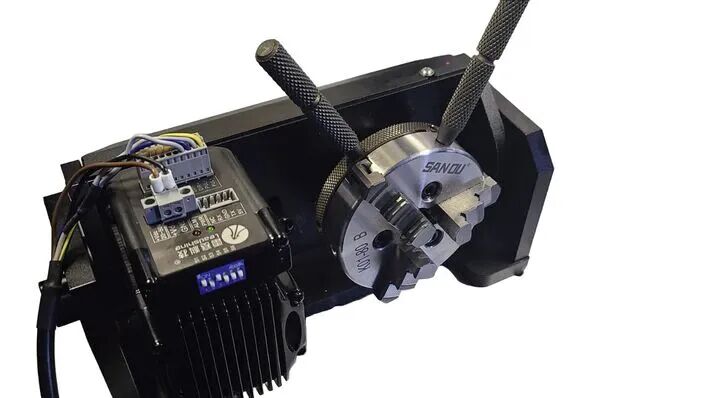
The holding structure keeps the workpiece stable as it rotates during laser processing.
The circumference of a straight cylindrical object is related to its diameter:
Circumference = π × Diameter
This relationship matters because one full rotation must correspond to the correct physical distance around the object. If the software's rotary calibration or object diameter does not match the real setup, the finished artwork can become stretched or compressed.
Tapered objects are more complex because their effective diameter changes along the length of the product. This is one reason conical drinkware requires additional attention to leveling, focus, artwork width, and rotary setup.
The engraving zone must remain within a useful focal range as the object rotates. On a straight cylindrical object, the top of the cylinder is commonly used as the reference area. The rotary axis should also be aligned correctly relative to the machine so the artwork does not appear tilted.
These are fundamental principles rather than model-specific installation instructions. Practical installation, focusing, measurement, framing, and test engraving depend on the specific rotary and laser setup.
Rotary attachments differ mainly in how they support or clamp the workpiece. Roller and chuck systems are the two most common categories, while ring and specialized industrial fixtures are used for more specific product geometries.
A roller rotary supports the object on rotating rollers. The rollers transfer motion to the object through friction, so the workpiece itself does not normally need to be clamped through its center.
This design is widely associated with tumblers, bottles, glasses, mugs, and other cylindrical drinkware because objects can often be loaded and removed quickly. The result depends on sufficient contact between the workpiece and rollers; highly tapered, unbalanced, or slippery objects can be more difficult to rotate consistently.
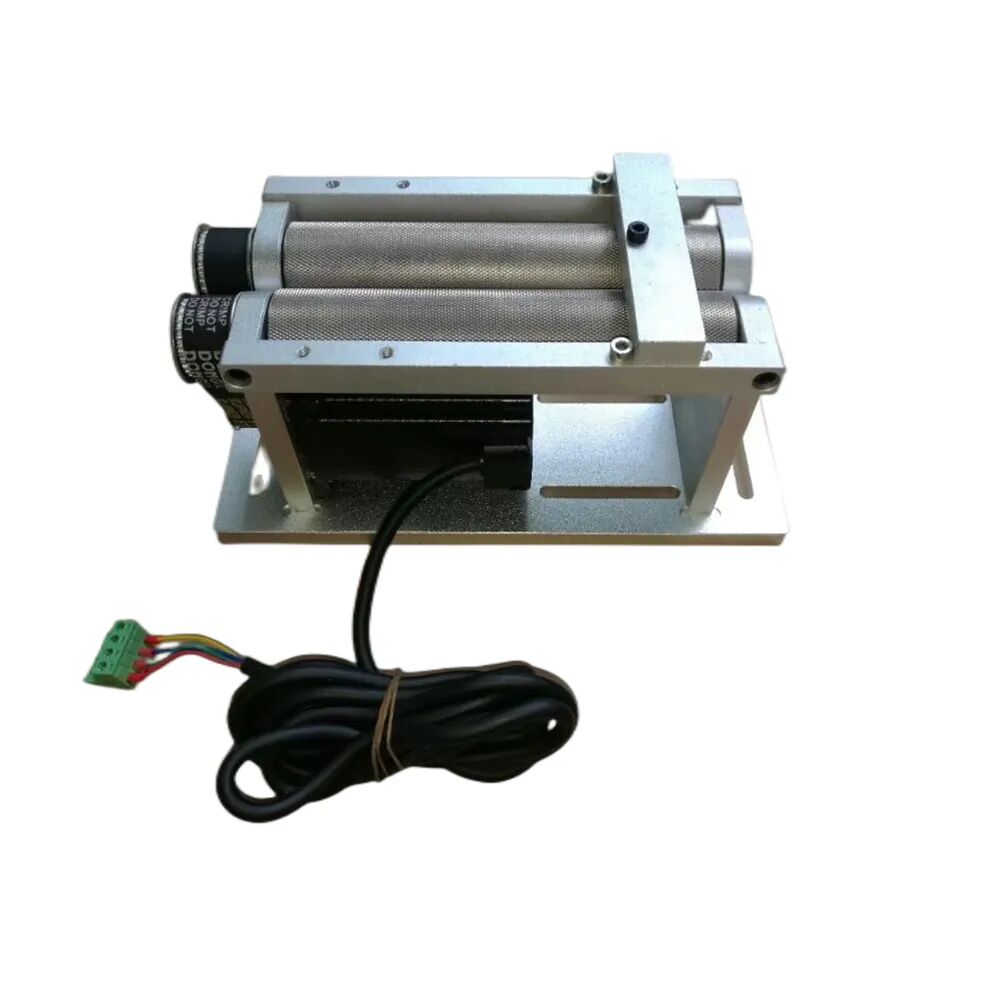
A roller rotary rotates the workpiece through frictional contact with supporting rollers.
A chuck rotary grips the workpiece mechanically, usually with jaws that clamp the inside or outside of a compatible cylindrical part. Because the object is positively held rather than relying only on friction, chuck systems can provide stable positioning for tubes, rods, pens, shafts, rings, and other parts that fit the clamping range.
Chuck systems generally require more setup for different diameters, and clamping pressure must be considered on fragile or easily marked surfaces.
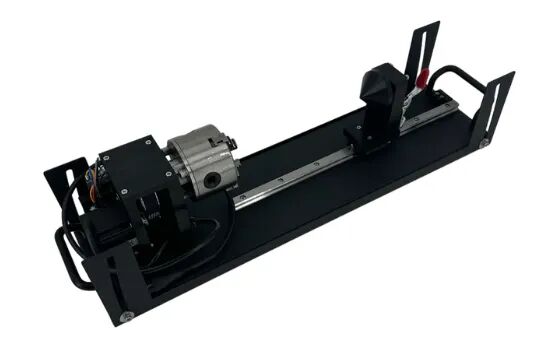
A chuck rotary mechanically clamps the workpiece for controlled rotational positioning.
Smaller rotary fixtures may be designed specifically for rings, bracelets, jewelry, pens, or other narrow products. Industrial rotary fixtures can also be customized for pipes, shafts, tools, medical parts, connectors, and repeat-production components.
Terminology varies between manufacturers. For example, “jaw rotary” may describe a dedicated fixture or a chuck-style system that uses mechanical jaws. The important distinction is how the workpiece is held and how accurately the fixture controls rotation.
| Factor | Roller Rotary | Chuck Rotary |
|---|---|---|
| Holding method | Object rests on rollers | Object is mechanically clamped |
| Rotation method | Friction between rollers and object | Direct rotation through chuck |
| Common object examples | Tumblers, bottles, mugs, glassware | Tubes, rods, pens, shafts, rings |
| Loading | Often faster | Requires clamping adjustment |
| Main limitation | Can slip or become unstable with difficult shapes | Clamping range and surface pressure must be considered |
Roller and chuck rotary attachments differ mainly in how they hold and rotate the workpiece.
A rotary attachment does not make every curved object automatically easy to engrave. Accuracy depends on several parts of the complete laser system working together.
The controller must translate motor movement into the correct physical surface movement. If the rotary calibration does not match the actual hardware, artwork dimensions can become stretched or compressed.
The entered or measured diameter should represent the area being engraved. This is especially important for tapered products because their diameter changes from one end to the other.
If the rotary axis is not parallel to the intended machine axis, a rectangular design can appear tilted on the finished object.
Slipping, wobbling, uneven weight distribution, or insufficient clamping can change the effective position of the surface during engraving. Heavy, tapered, long, or asymmetrical objects may require additional support.
The workpiece needs enough machine clearance to rotate through the required range without a handle, neck, support, or other feature contacting the laser head, enclosure, table, or fixture. The engraving zone must also remain within a usable focal range.
Exact rotary calibration values, software menus, diameter limits, and machine-specific installation steps belong to the specific rotary and laser model. Thunder Laser's current Roller Rotary Support Guide provides the current setup workflow for Thunder Laser hardware.
A rotary attachment is useful anywhere the product geometry requires controlled rotation. The products can range from personalized drinkware to industrial identification components.
Drinkware is one of the most common rotary applications. Logos, names, patterns, photographs, wedding designs, and decorative artwork can be engraved around tumblers, bottles, mugs, wine glasses, and similar products.

Rotary engraving allows curved glassware to rotate through a controlled engraving position.

Cylindrical drinkware is a common application for laser rotary attachments.
Learn more about laser processing on glass and explore additional rotary projects in the Thunder Laser Inspiration Library.
Rings, bracelets, metal bands, pens, flashlight bodies, and other narrow cylindrical products may use chuck, ring, or other compact rotary fixtures. The appropriate laser source depends on the material: for example, direct marking on many metals commonly uses a fiber or MOPA system such as the Thunder Aurora Series.
Industrial rotary fixtures can be used for cylindrical identification marks, serial numbers, logos, graduation marks, traceability information, and decorative or functional processing on tubes, shafts, connectors, and other components.

Rotary fixtures can support repeatable laser marking and engraving on industrial cylindrical parts.
For metal-processing considerations, see the Metal Laser Processing Guide.
A rotary attachment controls workpiece movement; it does not determine which materials the laser can process. Material compatibility still depends primarily on the laser wavelength, power, optics, and process.
| Laser Type | Typical Rotary Applications | Examples |
|---|---|---|
| CO₂ laser | Many non-metal and coated cylindrical products | Glassware, wood, coated tumblers, selected ceramics and coated surfaces |
| Fiber / MOPA laser | Direct metal marking and engraving on cylindrical parts | Rings, metal tubes, tools, metal components |
| UV laser | Fine marking on selected heat-sensitive materials | Selected plastics, glass, ceramics, electronic components |
Rotary compatibility and material compatibility are separate questions: the laser source must suit the material, while the machine and controller must support the rotary hardware.
Thunder Laser offers rotary-capable workflows across different machine categories, including RF CO₂ systems such as the Bolt Series, Nova Plus Series, and Titan Series, as well as fiber/MOPA marking workflows such as the Aurora Series.
Rotary engraving expands a laser system beyond flat products, but it also introduces additional mechanical and geometric constraints.
| Benefits | Limitations |
|---|---|
| Processes cylindrical and curved products | Machine clearance limits object diameter and geometry |
| Reduces repeated manual repositioning | Tapered and irregular objects require more setup |
| Supports wide and wraparound designs | Handles, necks, or protrusions can create collision risks |
| Can improve repeatability in batch production | Incorrect calibration or diameter can distort artwork |
| Expands the range of personalized and industrial products | Not every rotary fixture fits every machine or product |
These limitations are why the rotary type, machine clearance, object geometry, laser source, and software support should be considered separately rather than assuming that one rotary attachment can handle every cylindrical product.
Rotary engraving requires the control software and machine controller to understand that one motion axis is being used to rotate the object. Software normally needs information such as the rotary type, object diameter, and a hardware-specific rotation or calibration value.
Current Thunder Laser rotary workflows can be configured through software including LaserMaker, RDWorks, and compatible LightBurn setups. The exact menus and calibration values depend on the rotary hardware and machine, so those settings should not be treated as universal numbers.
This Wiki explains the principle rather than model-specific software settings. Use the machine-specific rotary instructions when configuring actual calibration values and hardware.
Once you understand what a rotary attachment does, the next step depends on whether you are selecting hardware or setting up an existing rotary. Product-specific selection should consider workpiece shape, stability, loading method, machine clearance, clamping requirements, and production volume.
You can also explore the Thunder Laser Accessories & Parts, watch machine and software tutorials in the Video Academy, learn rotary tools in the LaserMaker Tutorial Library, or submit a real cylindrical product through Material Testing when you need verified processing results.
Ready to Choose the Right Rotary Type?
Compare roller and chuck rotary attachments by workpiece shape, stability, loading method, machine clearance, and real production needs.
Talk To Our Experts Now!
Please leave your contact information so that we can serve you better.
FAQS
A laser rotary attachment rotates a cylindrical or curved workpiece while the laser engraves or marks it. This allows designs to follow the curved surface and makes wider or wraparound engraving possible without repeatedly repositioning the object by hand.
A motor rotates the workpiece while the laser controller or software coordinates that movement with the engraving path. The system uses rotary calibration and workpiece dimensions to translate the flat artwork into the correct physical distance around the curved surface.
A roller rotary supports the workpiece on rollers and turns it through friction. A chuck rotary mechanically clamps the object and rotates it directly. Roller systems are commonly associated with drinkware and bottles, while chuck systems are often used for tubes, rods, pens, rings, shafts, and other objects that benefit from positive clamping.
No. The laser machine needs compatible rotary-axis control, the correct electrical or controller connection, suitable software support, enough physical clearance, and a rotary fixture that matches the machine and intended workpiece.
Common examples include tumblers, bottles, mugs, glasses, pens, flashlights, pipes, tubes, rods, rings, bracelets, shafts, and other cylindrical or curved products. The actual range depends on the rotary fixture and machine clearance.
Yes, some rotary setups can process tapered objects, but the changing diameter makes alignment, focus, leveling, and artwork scaling more complex than on a straight cylinder. The fixture must also keep the workpiece stable as it rotates.
Potentially, but the handle changes the available rotation range and can create a collision risk. The complete workpiece should be checked through the required rotation before engraving to confirm that the handle will not contact the laser head, table, enclosure, or rotary fixture.
Diameter determines the circumference of a straight cylindrical object. The laser system needs the correct relationship between motor rotation and physical surface distance so the design is engraved at the intended size. Incorrect diameter or calibration can stretch or compress artwork.
Yes, compatible CO₂, fiber, MOPA, UV, and other laser systems can use rotary fixtures when the machine supports rotary control. The rotary controls the workpiece movement; the laser wavelength still determines which materials can be processed effectively.
Compatible Thunder Laser rotary workflows can use software including LaserMaker, RDWorks, and supported LightBurn configurations. Exact rotary type, diameter, pulse, or steps-per-rotation values depend on the actual hardware and machine, so use the current setup instructions for your specific rotary attachment.
NEED HELP FINDING THE RIGHT SOLUTION?
Talk to our team for machine recommendations, application advice, and support based on your needs.


 Stable & Consistent MachinesUnlimited ApplicationsRobust After-sales SupportFactory Direct Supply


